
How to Remove BestAdBid.com Redirect from All Browsers
Threat Name:
BestAdBid.com Redirect
Category
Browser Hijacker
Target
Invades Privacy
Threat Level
Moderate
Removal
Easy
Problem
Bestadbid.com hijacks all of your browsers. It attacks Chrome, Firefox, Edge, and Internet Explorer browsers. It redirects you to different ad pages with malicious content. It also does not let you change the settings.
Symptoms
When you open any of your browser, you see Bestadbid.com for a while in the address box then it redirects you to other websites which contains ads of malicious products.It does not let you to change the homepage and default search engine.
Solution
To remove Bestadbid.com redirect follow this guide. You can also remove it and other PUP from your computer with MalwareFox antimalware. It searches and removes all adware, PUP, and Trojans from your computer.
BestAdBid.com attacks on your computer and hijacks the options of all your browsers. It enters in your computer with free and pirated software you download from the internet. Once it gets into, it changes the settings of your browser and redirects to other pages. The other pages it leads you contains malicious product ads. If you mistakenly click on them you could end up harming your computer even more. It records your online activity like browsing history, search history etc. This data is sold to third party clients which is a breach to your privacy. In this article, you will know how to remove bestadbid.com redirect from your computer completely.

How BestAdBid.com gets into your Computer?
Browser hijacker like bestadbid.com bundles themselves with free and pirated software. When you download that software from the internet the hijacker also gets downloaded. At the time of installation, if you choose custom installation it shows you the terms & condition of that hijacker. The check box of this T&C page is pre-selected you gets confuse and click on next. After this it will hijack the options of your browsers.
What are the Potential Dangers to Not Remove BestAdBid.com Redirect?
Ruined Browsing Experience
BestAdBid.com changes your homepage and default search engine. It redirects you other webpages. The search result is also altered. It displays different ads on the search result page also. These ads redirect you to malicious pages. Overall it ruins your browsing experience.
Personal Information Theft
BestAdBid.com tracks user’s personal information like IP Address, Geo Location, Search Query, Browsing History, and the content on the pages. This information is used to serve targeted ads on the computer. This information is also sold to the third party clients to generate revenue.
Malicious Search Results
BestAdBid.com tracks your browsing history and searched queries. The search result displayed on the result page is not normal. It is altered and displayed different malicious ads on the result page. These ads redirect you to the pages that may contain more serious threat to your computer. So it is a good idea to remove this hijacker from all your browsers right now.
How to Remove BestAdBid.com Redirect from your Browser?
Manually Remove BestAdBid.com Redirect from your Computer
Manually Remove BestAdBid.com from your Computer Completely
Uninstall Unwanted Programs from your Computer
- WINDOWS 10
- wINDOWS 8 / 8.1
- WINDOWS 7 / VISTA
Right Click on the Start Menu and Click Control Panel

Choose Category View, Under the Program Section select Uninstall a Program

Now Find any recently installed potentially unwanted programs (PUP), select these applications and Click on Uninstall.


Remove BestAdBid.com from Browsers
- gOOGLE CHROME
- MOZILLA FIREFOX
- INTERNET EXPLORER
Delete Malicious Extensions from Google Chrome


Reset Google Chrome to Remove BestAdBid.com


Automatically Remove BestAdBid.com from your Computer
You have seen the manual process of BestAdBid.com removal. Surely you must experience it was not easy. Here I am suggesting you to use an automatic tool to do this task in less than 5 minutes. This tool is called MalwareFox, it automatically detects malware like BestAdBid.com and removes it from your computer. Enabling its real-time protection to keep you protected against all type of malware.
Step 1- Install MalwareFox on your PC
Open the Installer by Clicking on the Downloaded file.

Now choose your desired language and follow the instructions to install the MalwareFox on your computer.

After completing the installation, the MalwareFox will update the application to its latest version. Let it update.

Now it will sync the Malware database with server. It is important step as it needs to know latest types of malwares.

Step 2 - Scan and Clean your Computer for Malware
When the update process completes it will show Real Time Protection: On. Now you can scan your computer. Press Scan button and leave everything on MalwareFox, it knows how to deal with browser hijacker and other malwares.

See how MalwareFox detects BestAdBid.com in less than 7minutes.

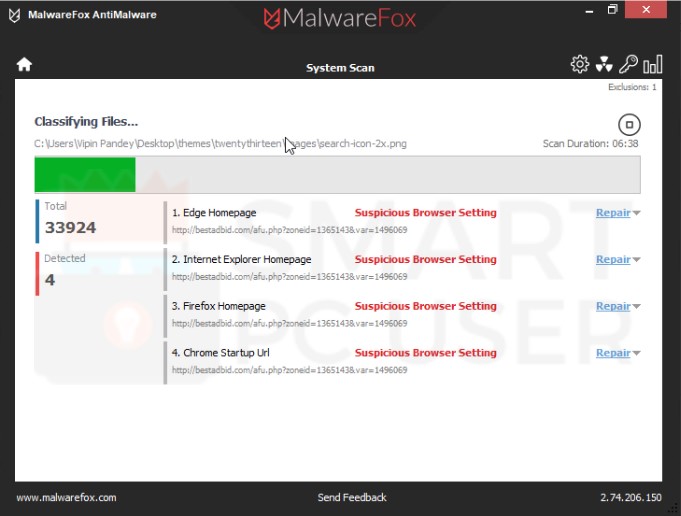
Screenshot of MalwareFox detecting BestAdBid.com Redirect
After the scan complete click on Next button to clean your computer completely.
How to Stay Away from BestAdBid.com and other Browser Hijackers?
You need to be little cautious in order to stay protected. Such malware take advantages of user's less awareness. BestAdBid.com spread through software bundling and some other method. It is better for you to not download free software from the internet. If you had to download watch the installations steps. There are options from which you can skip it. Also, you should not download the attachment from spam emails. These attachments contain the infection also. Having an antimalware installed on your computer is a better way to stay away from such malware. I suggest you install MalwareFox. It is good for this task. Keep enabling its real-time protection so that it can defend you from malware attacks.
Congratulations!
You have successfully removed BestAdBid.com Browser Hijacker from your computer system. Keep the Real time protection enabled in order to prevent any further attacks.