
Belonging to the Aurora ransomware family, Serpom ransomware is a malicious program. Serpom ransomware operates by encrypting the user’s data on the computer system. Later, it asks for a ransom amount to get the decryption tool to retrieve your files. Also, it renames the compromised files by adding the “.serpom” extension to it.
For instance, if you have a file with the name “Test.jpg,” then it renames it as “Test.jpg.serpom.” Additionally, it also creates three text files with instructions related to the encryption. It also shares the information to get the decryption tool. The text files that it creates on your system have the names “@_FILES_WERE_ENCRYPTED_@.TXT,” “@_HOW_TO_DECRYPT_FILES_@.TXT,” and “@_HOW_TO_PAY_THE_RANSOM_@.TXT.”

All the information provided in the text files is in the Russian language. It informs the user that decryption is possible using an RSA key. RSA is a type of algorithm used to encrypt your data. Also, the text provides a Tor site to perform the transaction of ransom. The user has to input a unique ID on the website that is provided in the document. Further, the site shows user-related information like IP address, size of encrypted data, and the date and time of encryption.
Developers behind the Serpom ransomware demands a ransom of 0.06341203 bitcoins. The bitcoin wallet address is present on the site. Also, the mentions that the user would get the decryption tool and key after the successful payment. Usually, cybercriminals do not provide any decryption tool even after payment. Thus, making you a victim of financial fraud. Therefore, we suggest not to pay the ransom amount to the developers.
One of the best ways to save your data is by having a backup stored in some other device.
This guide was written to help you remove the infection itself from your computer, and if a 100% proven method to recover the encrypted files is found we will update this guide.
We cannot help you recover your files and we can only recommend that you use ShadowExplorer or free file recovery software to restore your documents.
- 1. How did the Serpom ransomware get on my computer?
- 2. What is Serpom ransomware?
- 3. Is my computer infected with Serpom ransomware?
- 4. Is it possible to decrypt files encrypted by Serpom ransomware?
- 5. How to remove the Serpom ransomware (Virus Removal Guide)
- 6. How to prevent your computer from becoming infected by Serpom ransomware
1. How did the Serpom ransomware get on my computer?
The Serpom ransomware is distributed via spam email containing infected attachments or by exploiting vulnerabilities in the operating system and installed software.
Cyber-criminals spam out an email, with forged header information, tricking you into believing that it is from a shipping company like DHL or FedEx. The email tells you that they tried to deliver a package to you, but failed for some reason. Sometimes the emails claim to be notifications of a shipment you have made. Either way, you can’t resist being curious as to what the email is referring to – and open the attached file (or click on a link embedded inside the email). And with that, your computer is infected with the Serpom ransomware.
This ransomware was also observed attacking victims by hacking open Remote Desktop Services (RDP) ports. The attackers scan for the systems running RDP (TCP port 3389) and then attempt to brute force the password for the systems.
2. What is Serpom ransomware?
- Ransomware family: Aurora
- Extensions: .serpom
- Ransom note: @_FILES_WERE_ENCRYPTED_@.TXT
- Ransom: 0.06341203 bitcoins
- Contact: serpom@protonmail.com
This Serpom ransomware variant restricts access to data by encrypting files with the .serpom extension. It then attempts to extort money from victims by asking for “ransom”, in form of Bitcoin cryptocurrency, in exchange for access to data.
This ransomware targets all versions of Windows including Windows 7, Windows 8.1 and Windows 10. Serpom ransomware searches for files with certain file extensions to encrypt. The files it encrypts include important productivity documents and files such as .doc, .docx, .xls, .pdf, among others. When these files are detected, this infection will change the extension to .serpom, so they are no longer able to be opened.
The Serpom ransomware changes the name of each encrypted file to the following format: .serpom.
Files targeted are those commonly found on most PCs today; a list of file extensions for targeted files include:
.sql, .mp4, .7z, .rar, .m4a, .wma, .avi, .wmv, .csv, .d3dbsp, .zip, .sie, .sum, .ibank, .t13, .t12, .qdf, .gdb, .tax, .pkpass, .bc6, .bc7, .bkp, .qic, .bkf, .sidn, .sidd, .mddata, .itl, .itdb, .icxs, .hvpl, .hplg, .hkdb, .mdbackup, .syncdb, .gho, .cas, .svg, .map, .wmo, .itm, .sb, .fos, .mov, .vdf, .ztmp, .sis, .sid, .ncf, .menu, .layout, .dmp, .blob, .esm, .vcf, .vtf, .dazip, .fpk, .mlx, .kf, .iwd, .vpk, .tor, .psk, .rim, .w3x, .fsh, .ntl, .arch00, .lvl, .snx, .cfr, .ff, .vpp_pc, .lrf, .m2, .mcmeta, .vfs0, .mpqge, .kdb, .db0, .dba, .rofl, .hkx, .bar, .upk, .das, .iwi, .litemod, .asset, .forge, .ltx, .bsa, .apk, .re4, .sav, .lbf, .slm, .bik, .epk, .rgss3a, .pak, .big, wallet, .wotreplay, .xxx, .desc, .py, .m3u, .flv, .js, .css, .rb, .png, .jpeg, .txt, .p7c, .p7b, .p12, .pfx, .pem, .crt, .cer, .der, .x3f, .srw, .pef, .ptx, .r3d, .rw2, .rwl, .raw, .raf, .orf, .nrw, .mrwref, .mef, .erf, .kdc, .dcr, .cr2, .crw, .bay, .sr2, .srf, .arw, .3fr, .dng, .jpe, .jpg, .cdr, .indd, .ai, .eps, .pdf, .pdd, .psd, .dbf, .mdf, .wb2, .rtf, .wpd, .dxg, .xf, .dwg, .pst, .accdb, .mdb, .pptm, .pptx, .ppt, .xlk, .xlsb, .xlsm, .xlsx, .xls, .wps, .docm, .docx, .doc, .odb, .odc, .odm, .odp, .ods, .odt
Once your files are encrypted with the .serpom extension, this ransomware will create the @_FILES_WERE_ENCRYPTED_@.TXT ransom note in each folder that a file has been encrypted and on the Windows desktop.
When the infection has finished scanning your computer it will also delete all of the Shadow Volume Copies that are on the affected computer. It does this so that you cannot use the shadow volume copies to restore your encrypted files.
3. Is my computer infected with Serpom Ransomware?
When Serpom ransomware infects your computer it will scan all the drive letters for targeted file types, encrypt them, and then append the .serpom extension to them. Once these files are encrypted, they will no longer able to be opened by your normal programs. When this ransomware has finished encrypting the victim’s files, it will create a @_FILES_WERE_ENCRYPTED_@.TXT text file which includes instructions on how to recover the files.
Below is the message that you will see in the @_FILES_WERE_ENCRYPTED_@.TXT file:
>>>>> CRYPTO LOCKER <<<<< К сожалению, ваша система безопасности не прошла наш тест. Мы решили помочь вам улучшить её. Ваши файлы зашифрованы. Содержимое файла зашифровано случайным ключом. Мы НАСТОЯТЕЛЬНО РЕКОМЕНДУЕМ вам НЕ использовать «инструменты дешифрования». Эти инструменты могут повредить ваши данные, делая восстановление невозможным. Также мы рекомендуем не связываться с компаниями по восстановлению данных. Они просто свяжутся с нами, купят ключ и продадут его вам по более высокой цене. Если вы хотите расшифровать ваши файлы, вы должны получить закрытый ключ RSA. -- Как с нами связаться и узнать КОЛИЧЕСТВО и ДЕТАЛИ кошелька BTC для ОПЛАТЫ? -- Чтобы получить закрытый ключ RSA, вы должны связаться с нами по ссылке ниже, расположенной в частной сети TOR. По этой ссылке вы можете получить всю необходимую поддержку и произвести оплату. Вам просто нужно скачать и установить браузер TOR (Google) через официальный сайт и перейти по ссылке: >> hxxp://hwqnfy6yjtsyrhhvsaguyedtzz2rpw5em6a7s5bw7ynxln2oogqnroad.onion<< -- Если у вас возникли проблемы с браузером TOR, напишите нам: >> serpom@protonmail.com << и отправьте нам свой идентификатор: >> 1260682360 << -- КАК понять, что мы НЕ мошенники? -- Вы можете запросить ПОДДЕРЖКУ для ТЕСТ-расшифровки ОДНОГО файла! -- После успешной оплаты и расшифровки ваших файлов мы предоставим ПОЛНУЮ ИНФОРМАЦИЮ КАК УЛУЧШИТЬ вашу систему безопасности. Мы готовы ответить на все ваши вопросы! >>>>> CRYPTO LOCKER <<<<<
4. Is it possible to decrypt files encrypted with the Serpom ransomware?
The security companies and government officials often release decryptors for ransomware. You can take help of these decryptors to decrypt your encrypted files by Serpom ransomware.
However, it is not necessary that decryptors are available for kind and type of the ransomware you got infected. Especially if the ransomware is new and widespread, then it is most likly that you won't find decryptors for it. If it is an old and popular ransomware then you might find the decryptors.
The first step towards finding the decryptor is to know the acutal name and type of ransomware you get infected. To do that you can take help of NoMoreRansom.org. Visit the website and paste the ransom note in box provided. You can also upload the encrypted file to know the ransomware name. Once you do that click on GO! FIND OUT button.
Now the website will tell you about the type of ransomware and also provide you link if there is a decryptor available.
ID Ransomware is a similar website, you can upload the ransom note, sample encrypted file, or the contact email address to know about the type of ransomware. Once you know about it you can find the decryptors on the internet. But do not download decryptors from shady websites they may further infect your computer.
However you can trust the decryptors for Serpom ransomware from the below sites.
If you haven't find the decryptors then it is not possible to get your files back. That doesn't mean you should pay ransom to the cybercriminals. Do not pay any money to recover your files. Even if you were to pay the ransom, there is no guarantee that you will regain access to your files.
If you’ve already paid the ransom, immediately contact your bank and your local authorities. If you paid with a credit card, your bank may be able to block the transaction and return your money.
You can also contact the following government fraud and scam reporting websites:
- In the United States, go to the On Guard Online website.
- In Australia, go to the SCAMwatch website.
- In Canada, go to the Canadian Anti-Fraud Centre.
- In France, go to the Agence nationale de la sécurité des systèmes d’information
- In Germany, go to the Bundesamt für Sicherheit in der Informationstechnik website.
- In Ireland, go to the An Garda Síochána website.
- In New Zealand, go to the Consumer Affairs Scams website.
- In the United Kingdom, go to the Action Fraud website.
If your country or region isn’t listed here, we recommend that you contact your country or region’s federal police or communications authority.
5. How to remove the Serpom ransomware (Virus Removal Guide)
It’s important to understand that by starting the removal process you risk losing your files, as we cannot guarantee that you will be able to recover them. MalwareFox and HitmanPro can detect and remove this infection, however, these programs cannot recover your documents, pictures, or files. Your files may be permanently compromised when trying to remove this infection or trying to recover the encrypted documents. We cannot be held responsible for losing your files or documents during this removal process.
STEP 1: Use MalwareFox to remove Serpom ransomware
MalwareFox is antimalware that works on heuristic approach to detect and remove malware from your PC. It analyzes the malware signatures as well as their behaviour. If a program acts like a malware then MalwareFox blocks it right there. It is lightweight on your system resource and finishes the scan quickly.
Its not like I am recommending you to install a costly software to remove the malware. The MalwareFox subscription charges are fairly low. But that is for a fully featured program with real-time protection capabilities. The scanning works even with the free version, though you can try the MalwareFox Premium for 14 days. Also, you don't need to remove your current antivirus, MalwareFox will work effectively without any conflicts.
-
Download MalwareFox.
You can download MalwareFox by clicking the link below.
-
Double-click on the MalwareFox setup file.
Once the MalwareFox is downloaded, double click on MalwareFox.exe file to install it on your PC. The downloaded files are mostly saved to the Downloads folder.

You will see an User Account Control pop-up asking if you want to allow MalwareFox to make changes to your device. Click on “Yes” to proceed with the installation steps.

-
Follow the on-screen prompts to install MalwareFox.
First MalwareFox installer ask you to choose the language, select your preferend language and click on OK.

Then the MalwareFox installation Wizard appears, click on Next and follow the screen instructions to setup MalwareFox on your PC.

Once the installation is complete, MalwareFox will download the latest version and virus signatures from the server. Let it update.

-
Click on “Scan” Button.
To perform a system scan, click on the “Scan” button.

-
Wait for MalwareFox scan to complete.
MalwareFox is now scanning your computer for adware, pop-ups, browser hijackers, and other malicious programs. This process can take a few minutes, so you can do some other work while it is scanning your PC, don't worry the PC won't get slow during the scan.

-
Click on “Next”.
Once the scan has completed, you will see the list of detected threats on your PC. To remove the malware that MalwareFox has found, click on the “Next” button.

When the malware removal process is complete, you can close MalwareFox and continue with the rest of the instructions.

STEP 2: Use HitmanPro to scan for malware and unwanted programs
HitanPro works on unique cloud-based approach to detect the threats. You can use it as a second opinion malware scanner. HitmanPro also observe the behaviour active programs and checks the locations where malware normally resides. If there is a suspicious file then it upload thes file to cloud where it is scanned by Bitdefender and Kaspersky antivirus engines.
HitmanPro is available for a 30-days trail that lets you to clean the threats. After that you may need to purchase it which costs around $24.95 for 1 year single PC. If you won't upgrade then you can scan using the HitmanPro however it won't let you remove or quarntine the detected threat.
-
Download HitmanPro.
You can download HitmanPro by clicking the link.
 HITMANPRO DOWNLOAD LINK
(The link will open a new page from where you can download HitmanPro) -
Install HitmanPro.
When HitmanPro has finished downloading, double-click on “hitmanpro.exe” if you have 32-bit Windows or “hitmanpro_x64.exe” if you have 64-bit windows, to install this program on your PC. In most cases, downloaded files are saved to the Downloads folder.

Now you will see an User Account Control pop-up asking if you want to allow HitmanPro to make changes to your device. Click “Yes” to install it on your PC.

-
Follow the screen instructions.
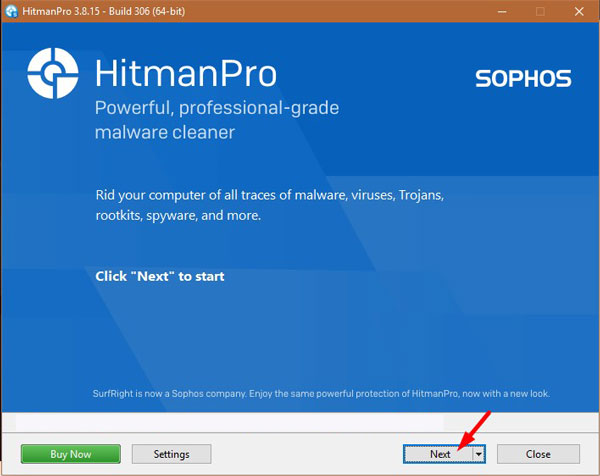
When HitmanPro starts you will see the start screen as shown below. Click on the “Next” button to perform a system scan.

-
Wait for the HitmanPro scan to complete.
HitmanPro will now start scanning your PC for malware. This process may take a few minutes.

-
Click on “Next”.
Once HitmanPro finished the scan, you will see a list of all the malicious programs that it found in your system. Click on the “Next” button to remove the malware.

When the process is complete, you can close HitmanPro and continue with the rest of the instructions.
STEP 3: Restore the files encrypted by Serpom ransomware with recovery software
Option 1: Restore your files encrypted by Serpom ransomware with ShadowExplorer
Serpom will attempt to delete all shadow copies when you first start any executable on your computer after becoming infected. Thankfully, the infection is not always able to remove the shadow copies, so you should continue to try restoring your files using this method.
- You can download ShadowExplorer from the below link:
SHADOW EXPLORER DOWNLOAD LINK (This link will open a new web page from where you can download “ShadowExplorer”) - Once you have downloaded and installed ShadowExplorer, you can follow the below video guide on how to restore your files while using this program.
Option 2: Restore your files encrypted with the Serpom extension with File Recovery Software
When the files are encrypted with the Serpom, this ransomware first makes a copy of them, encrypts the copy, and then deletes the original. Due to this you can use file recovery software such as:
- Recuva
You can follow the below guide on how to use Recuva:
How to prevent your computer from becoming infected by Serpom ransomware
To protect your computer from the Serpom ransomware, you should a strong antimalware on your system like MalwareFox and keeps its real-time protection enabled. Also, you need to take backup of your personal documents.
Your computer should now be free of the Serpom ransomware infection. If you are still experiencing problems while trying to remove Serpom ransomware from your computer, please comment below we will try to help you as much as possible.